

Mellstroy Registration: Create Your Casino Account
Choose an account currency, enter your phone number and email, then set a password. Mellstroy puts these fields in one registration form, with an optional promo code and a consent checkbox. You can also register through a social account. Your currency choice determines which welcome package applies.
18+ · New players only · Operator bonus terms apply · Play responsibly
 Written by Anusha Khan · Checked by: Denise MatheyUpdated
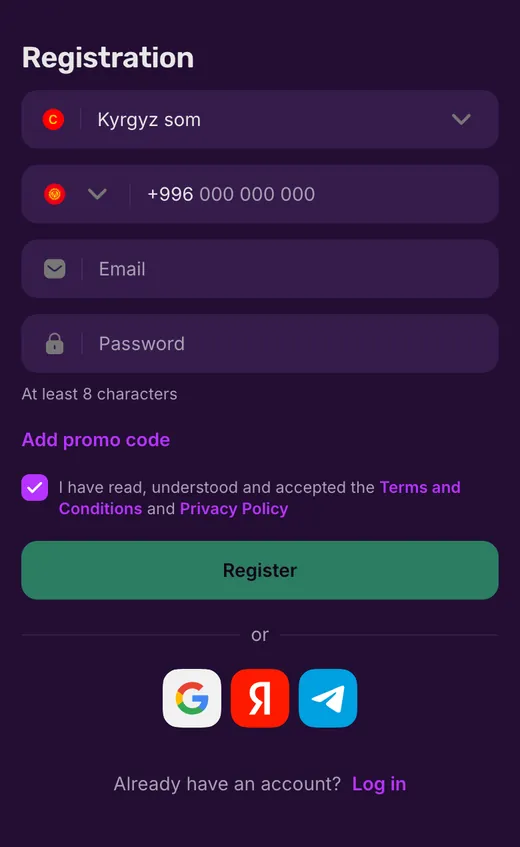
- Enter your account currency, phone with country code, email and a password of at least 8 characters; a promo code is optional.
- Social registration is another route.
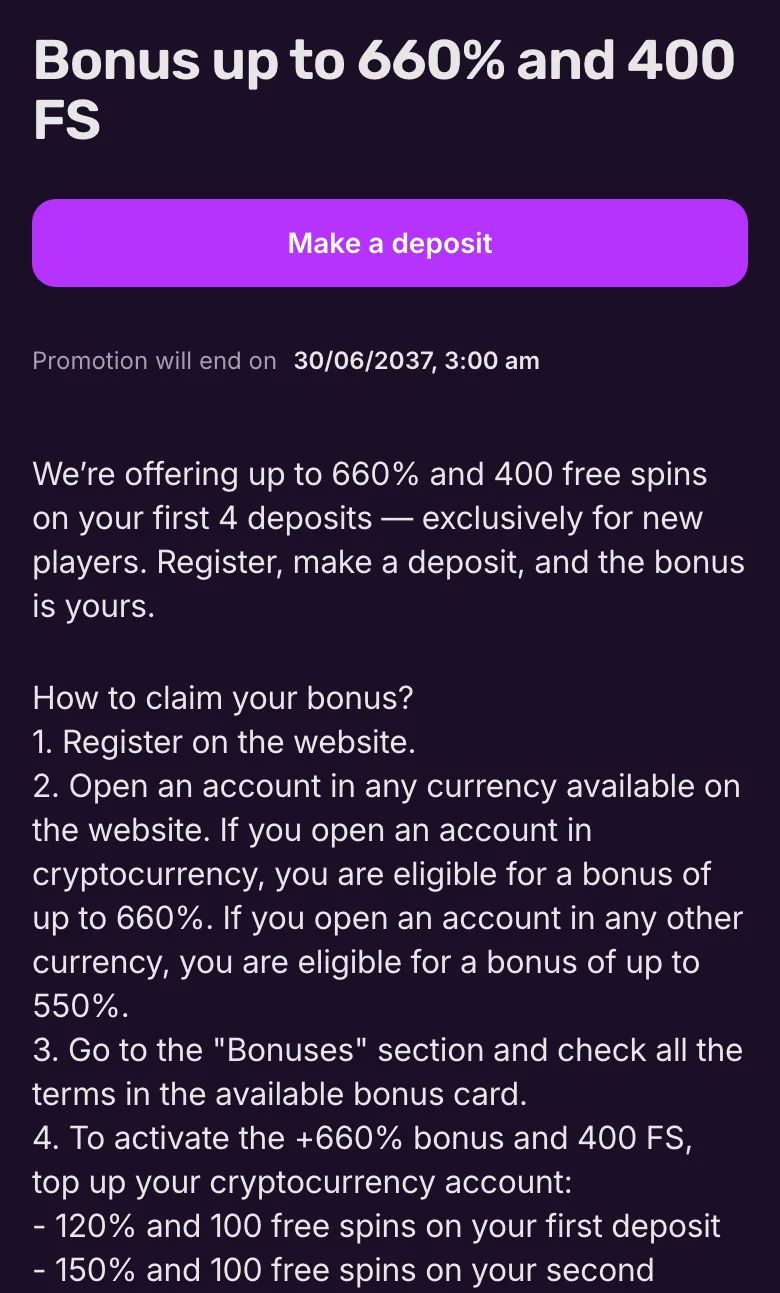
- New players receive a package across their first 4 deposits: up to 550% + 400 FS on a fiat account, or up to 660% + 400 FS on a crypto account.
- Neither package needs a promo code.
Mellstroy registration at a glance
The form combines your contact details with an account currency choice; these are the essentials before you submit it.
| Registration detail | What applies |
|---|---|
| Form fields | Currency, phone, email, password and optional promo code |
| Social registration | Google, Yandex, Telegram, Mail.ru and VK |
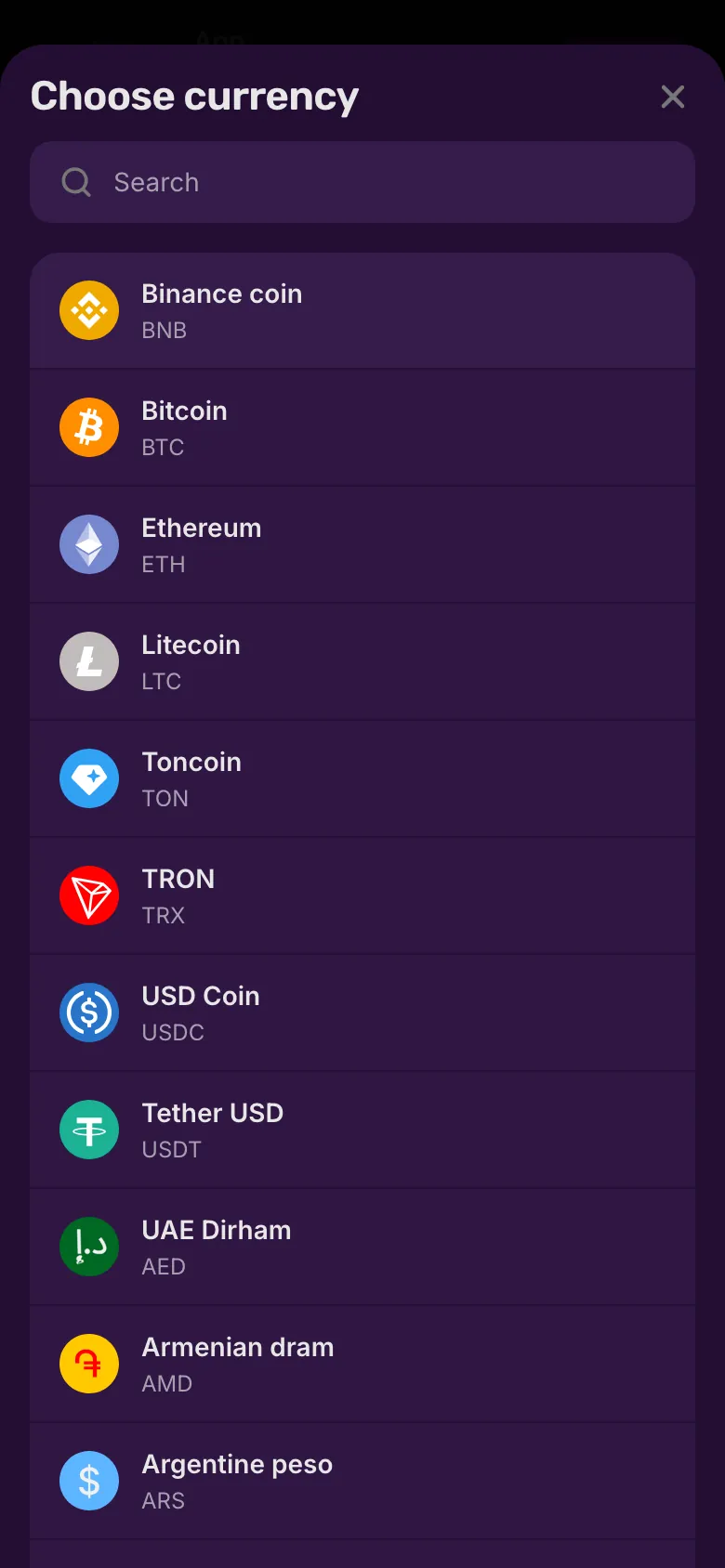
| Account currencies | 12 listed fiat currencies plus crypto |
| Crypto options | BNB, BTC, ETH, LTC, TON, TRX, USDC and USDT |
| Age requirement | Age and access requirements at the foot of this page |
| Promo code | Optional; not needed for the welcome package |
| Welcome package | Fiat: up to 550% + 400 FS; crypto: up to 660% + 400 FS |
| Contact rewards | 40 FS; at least 2 deposits before confirming contacts |
| Documents | Mellstroy can request them at any time; withdrawals require verification |
| Interface languages | 7 languages, including English |
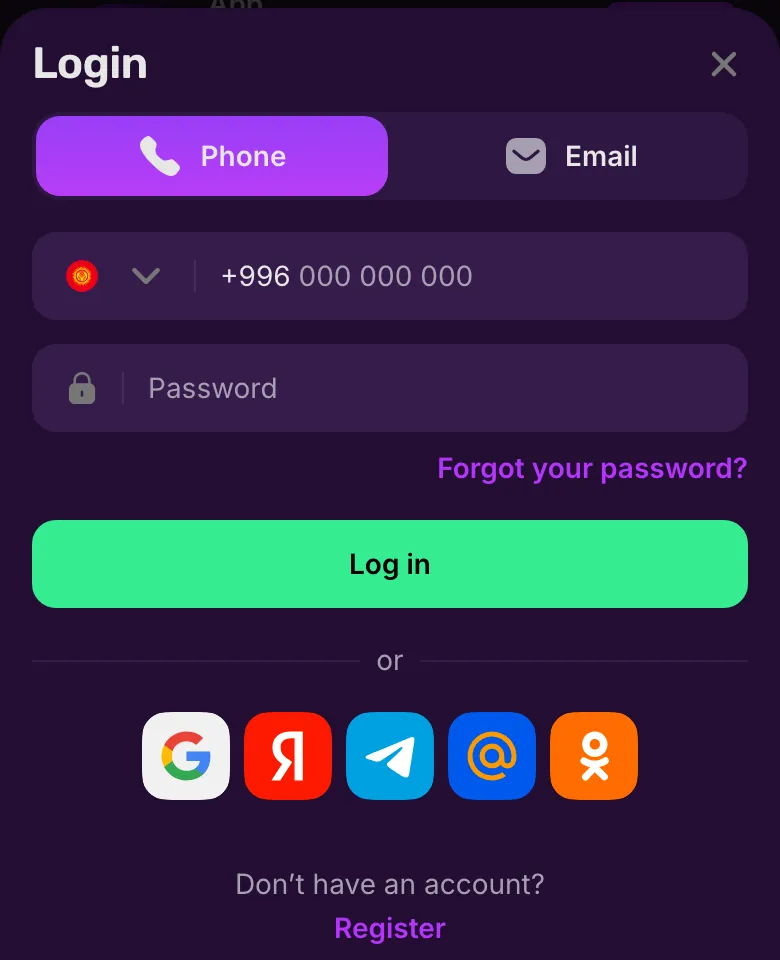
If you already have an account, use your existing account sign-in to return to it.
Mellstroy registration screen by screen
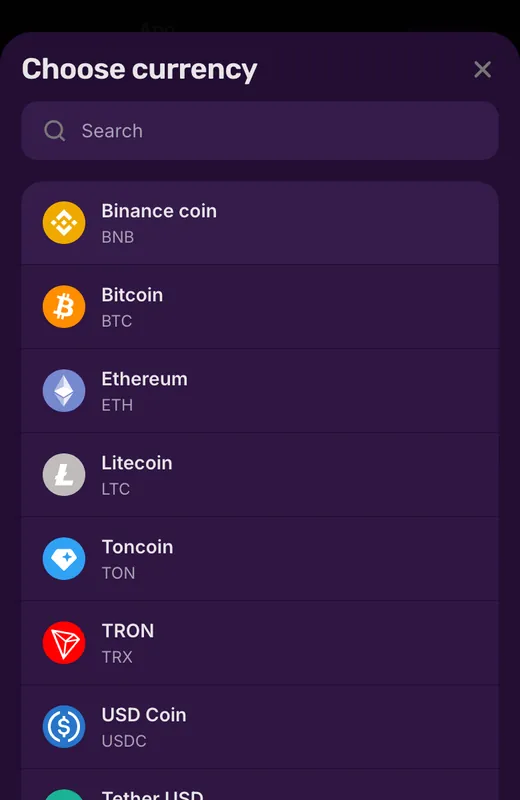
Find the account currency
Type the name into search or scroll the list.
You see: Next to ordinary currencies the list has cryptocurrencies: Bitcoin, Ethereum, USDT and others.
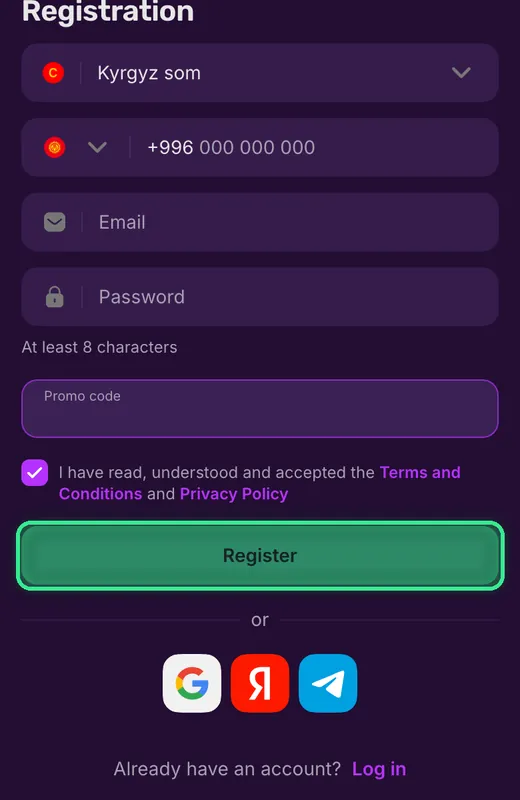
Promo code and submit
If you want, press Add promo code, then Register (framed).
You see: The Promo code field appears above the terms checkbox.
If not: The promo code is optional: the form can be sent without it.
How to register at Mellstroy
Start with the currency selector at the top of registration. The phone and email fields appear together, so enter both when you use the form.
- 1
Choose your currency
Select the currency for your account. USD and EUR are fiat options; selecting crypto determines the crypto welcome package. - 2
Enter your phone number
Choose the country code and enter your number in the phone field. Keep the code separate from the rest of the number. - 3
Add email and password
Enter your email and set a password. The password field requires a minimum of 8 characters. - 4
Complete the form
Add a promo code if you have one, accept the Terms and Privacy Policy, then submit your registration.
The consent checkbox covers both documents, and the English edition of the Terms is the binding version. The account terms you accept also govern the details you supply later in your profile.
Phone and email
Enter contact details you can access: phone confirmation uses an SMS code, while email confirmation uses a link in a message. Once you confirm these details, you need support to change them.
Your password
Account settings let you change your password using the current password. You can also review active sessions and end them from settings; keep your login details to yourself.
Phone, email and password in the registration window
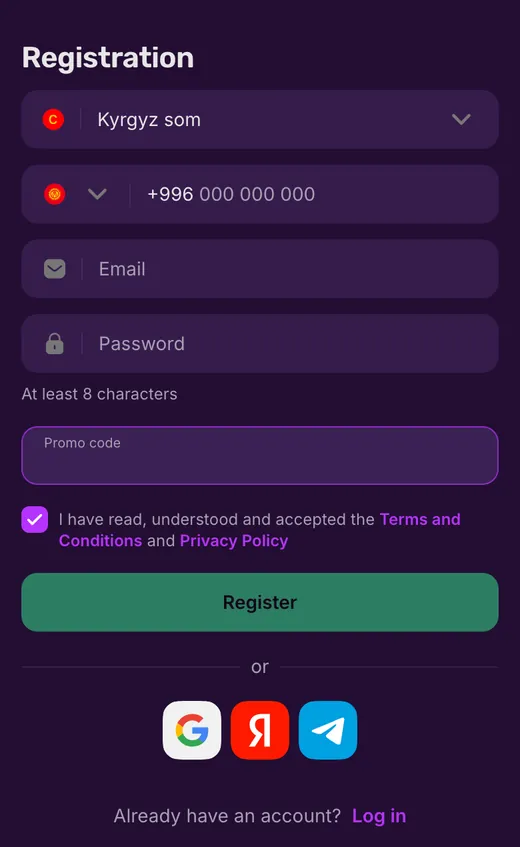
The currency selector sits above the contact fields. Below the password field, the form offers an optional promo code before the consent checkbox and submission button.
The social icons beneath the button offer an alternative to entering the form details. The form requirements below distinguish these initial fields from details Mellstroy can request later.
Complete the mobile registration form
The form puts the currency and contact fields above the final consent box.
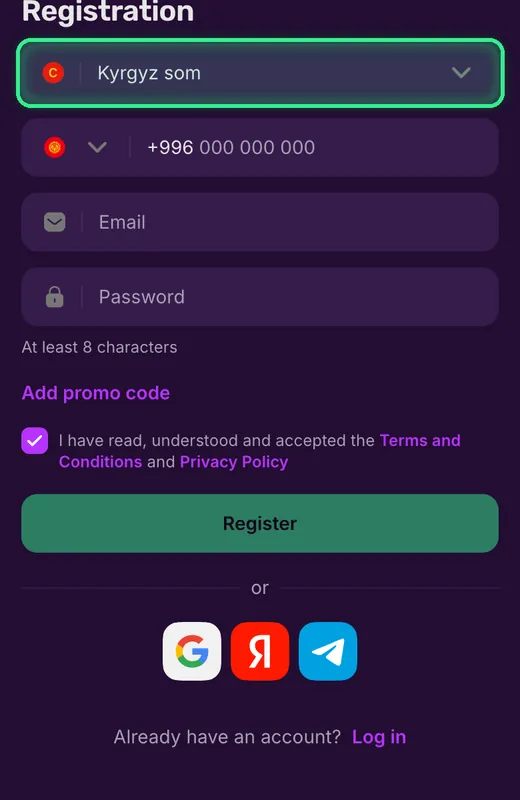
Fill in the account details
Select the currency, then fill in the phone, Email and Password fields.
You see: The ‘At least 8 characters’ hint sits above Add promo code. Open that optional field only if you have a code.
Accept and submit
Tick the consent box, then press Register.
You see: The same window has Google, Yandex and Telegram icons, plus a Log in link for an existing account.
The currency choice belongs at the start of this form, before you submit your details.
Promo codes during registration
You can leave the promo code field blank. The welcome package follows your account currency and deposits, so registration does not depend on finding a code.
- Is a code required?
- No. The welcome package applies without a promo code.
- Where does a registration code go?
- Expand the optional promo code field below the password and enter your code before submitting the form.
- Where are vouchers published?
- Mellstroy publishes vouchers through Telegram and VK. Vouchers are a separate mechanism: you activate them in the account's voucher section.
A voucher has its own currency and activation period; the difference between registration codes and vouchers explains which field applies.
 New account offer
Registration fields and details requested later
Your name and date of birth are not fields on the registration form. Document uploads belong to identity checks, which Mellstroy can request at any time.
Allowed
- ✓On the form: account currency
- ✓On the form: phone number and email
- ✓On the form: password and optional promo code
- ✓Consent to the Terms and Privacy Policy
Not allowed
- ✕Name entry is not part of this form
- ✕Date of birth is not an initial form field
- ✕Document upload is not part of the registration form
Watch out
- !One account per person; enter genuine personal details
- !Mellstroy can request identity documents at any time
- !Withdrawals require completed verification
Keep these stages separate
- 1
Treating contact confirmation as KYC
Confirming a phone number or email does not replace identity verification. Documents can still be required. - 2
Creating another account
If you already registered, return to that account. Duplicate accounts from the same device, IP or household are prohibited.
Account settings include personal details beyond the initial form. The identity verification requirements explain the documents Mellstroy can request and how that affects withdrawals.
Pick your Mellstroy account currency
USD and EUR appear in the account currency list alongside other fiat options and crypto. Choose from that list when you register.
| Account choice | Available option |
|---|---|
| USD | Listed fiat currency |
| EUR | Listed fiat currency |
| Crypto | Listed; welcome package up to 660% + 400 FS |
The crypto choices are BNB, BTC, ETH, LTC, TON, TRX, USDC and USDT. Selecting a crypto account determines the crypto welcome package; a fiat account follows the non-crypto package.
The deposit-by-deposit breakdown shows the percentages for each account type. The larger crypto headline describes the combined welcome stages, rather than a single deposit bonus.
What a new Mellstroy player receives
Mellstroy credits the welcome bonus after each qualifying deposit in the package. Free spins become available after you use the percentage bonus.
| Deposit | Fiat bonus | Crypto bonus | Free spins |
|---|---|---|---|
| First | 100% | 120% | 100 FS |
| Second | 125% | 150% | 100 FS |
| Third | 150% | 180% | 100 FS |
| Fourth | 175% | 210% | 100 FS |
Each stage needs its next deposit; registration alone does not credit the deposit package. Exact terms appear in the bonus card in the Bonuses section, including the requirements for using the bonus balance.
Casino bonuses and sports bonuses have separate balances: a casino bonus applies in the casino, while a sports bonus applies to betting. Requesting a withdrawal with an active welcome bonus cancels that bonus.
Installing the app on Android or iOS also earns 200 Mell Points. Points require a deposit before you can exchange them for money; the welcome package conditions describe the separate deposit offer.
What to do after registration
Make the required deposits before confirming your contacts if you want the contact-confirmation rewards. Entering a phone number and email in the registration form is separate from confirming them in settings.
- Payments
Fund your account
Use the cashier in your account; the payment methods shown depend on your region. - Verification
Confirm your phone
After the required deposits, request the confirmation code in settings and enter the SMS code. - Contact checks
Confirm your email
After the required deposits, request the confirmation email in settings and follow its link. - Bonus details
Receive 40 FS after qualifying deposits
Phone: 20 FS; email: 20 FS. Make at least two deposits before confirming either contact.
Mellstroy can request identity documents at any time, and withdrawals require completed verification. Prepare your documents alongside these account steps; confirming your contacts does not complete KYC.
The minimum withdrawal is 10 EUR or its equivalent. Casino games, live casino, Mell Originals and Bonus buy sit alongside sports betting on the same platform.
If you cannot finish registration
A rejected number calls for checking the phone field and country code. With an existing account, sign in instead of registering again.
Number not accepted
Check that the country code and the rest of your phone number are in the correct fields.Address will not open
The alternative access route shows how to reach Mellstroy when the usual address will not load.Account already exists
Use sign-in for an account you already hold; the rules prohibit duplicate accounts.
For help with the form, Mellstroy support offers chat 24/7, or you can email [email protected]. If your phone or email is already confirmed, support handles changes to those details.
Terms used in registration and bonuses
- Fiat
- A conventional currency, such as USD or EUR, rather than a cryptocurrency.
- FS
- Free spins: bonus spins in slots. Their winnings follow the bonus terms.
- KYC
- Know Your Customer: identity checks that can include documents and proof of address.
- Mell Points
- Mellstroy loyalty points. Exchanging them for money requires a deposit and the exchange threshold.
Sources
Where the facts on this page come from
- Mellstroy websiteRegistration entry and account options
- Mellstroy bonusesWelcome package and contact confirmation
Mellstroy registration FAQ
Choose your currency, enter a phone number with its country code and your email, then set a password of at least 8 characters. Accept the Terms and Privacy Policy and submit the form. Alternatively, use a social account to register.
No. The promo code field is optional, and Mellstroy credits the welcome package without a code after qualifying deposits.
Choose the currency you intend to play in. USD, EUR, other listed fiat currencies and crypto are options. Crypto accounts qualify for up to 660% + 400 FS; fiat accounts qualify for up to 550% + 400 FS across the welcome deposits.
At any time. Completing the registration form does not replace KYC, and withdrawals require completed verification. Contact confirmation and identity verification are separate processes.
No cash bonus comes without a deposit. You can receive 100 Mell Points for a first push subscription on Android and 200 Mell Points for installing the app. Exchanging Points for money requires at least one deposit and the exchange threshold.
Confirm your phone for 20 FS and your email for 20 FS in account settings. You must make at least two deposits before confirming either contact to qualify for these rewards.
No. Mellstroy allows one account per person. Duplicate accounts from the same device, IP address or household are prohibited; use your existing login instead.
- First version of the page.
Who runs this page
mellstroy.ing is an information site, not Mellstroy and not its official page: no deposits, bets or accounts are handled here.
The operator does not publish a licence, regulator or legal entity. Its Terms make you responsible for checking that online gambling is lawful where you live; one account per person, and VPNs, proxies and TOR are not allowed.
For adults (18+) only. If play stops being fun, plan a budget and find help.
New account offer
Register through a social account
Mellstroy also offers registration through social accounts. Choose the provider you use from the registration options.
Google
Use the Google registration option with your Google account.Yandex
Choose Yandex to register through your Yandex account.Telegram
Select Telegram as your social registration route.Mail.ru
Use your Mail.ru account through the corresponding registration option.VK
Choose VK to register through your VK account.Social registration creates an account for the same casino and sports platform. An existing player should use the returning-player login options instead of creating another account.